

As an Amazon Associate, TrustedBarber earns from qualifying purchases.
Zero-gapping means lining up a clipper’s blades so the top blade sits even with the bottom blade, for a closer cut. Barbers use it for skin fades and sharp lines. It can also cause nicks if done wrong. We explain what it is, how it works, and where the manufacturer advice differs. Here is where the makers land.
Top picks
- Factory zero-gap clipper: Wahl 5 Star Cordless Senior, about $175–195 · Check Wahl 5 Star Cordless Senior Price
- Adjustable fade blade: Andis reVITE, about $140–160 · Check Andis reVITE Price
- Oil for every adjustment: Wahl Premium Blade Oil, under $10 · Check Wahl Premium Blade Oil Price
In this guide
- Quick Answer
- Why Barbers Zero-Gap
- Can Your Clipper Be Zero-Gapped?
- The Basic Steps
- After the adjustment: checking the blades
- Safety Notes
- What Viewers Say
- What Wahl Says to Do Every Time
- Troubleshooting From the Maker
- Replacement blades
- Heat, oil and coolant
- Factory-Adjustable Blades
- Trimmers or Clippers?
- Who should skip zero-gapping
- The bottom line
- FAQ
Quick Answer
Quick verdict
- What it is: aligning the blades so there is no overlap between the cutting and static blades, per the Ceramic Clipper Blade Company zero-gapping guide (June 2023).
- The catch: Wahl’s own maintenance guide says the top blade teeth should sit 1/32 to 1/16 inch back from the bottom blade teeth, so the clipper does not cut too close or let the moving blade touch skin. Zero-gapping goes past that setting.
- If you try it: go slowly, use a model whose blade set allows it, and expect a closer, riskier cut.
Quick take
Zero-gapping means aligning the blades so there is no overlap between the cutting and static blades, per the Ceramic Clipper Blade Company guide.
Why Barbers Zero-Gap
The Ceramic Clipper Blade Company, which sells blades and slides, says a zero-gapped clipper shaves about as close as you can get without a foil or razor, and helps make skin fades. It also says there is less chance of hair being trapped. That is a vendor view, so treat the benefits as claims, not proof.
Can Your Clipper Be Zero-Gapped?
The same guide says not all clippers can. It says some lower-end blade sets adjust only a little. It says Wahl’s 1919 clipper has a three-hole blade slide that stops full alignment, while two-hole slides allow it. Wahl’s guide describes both 2-hole and 3-hole alignment, and gives the 1/32 to 1/16 inch spacing for each. Check your blade type before you start.
Good to know
Not all clippers can be zero-gapped. Some lower-end blade sets adjust only a little.
The Basic Steps
- Unplug or turn off the clipper and remove any guard.
- Brush the blades clean and add oil.
- Loosen the blade screws a little, enough to move the bottom blade.
- Move the blade adjustment lever fully forward, then slide the bottom blade until the teeth line up as the guide describes.
- Tighten the screws, switch the clipper on and off, and check the alignment again.
The vendor guide says you need a screwdriver that fits your blade screws, a brush and clipper oil. For Wahl’s recommended spacing, see the Wahl Clipper Maintenance Guide. Because that spacing is not zero, a zero gap setup is something you are choosing against the maker’s guidance.
Tools for these steps
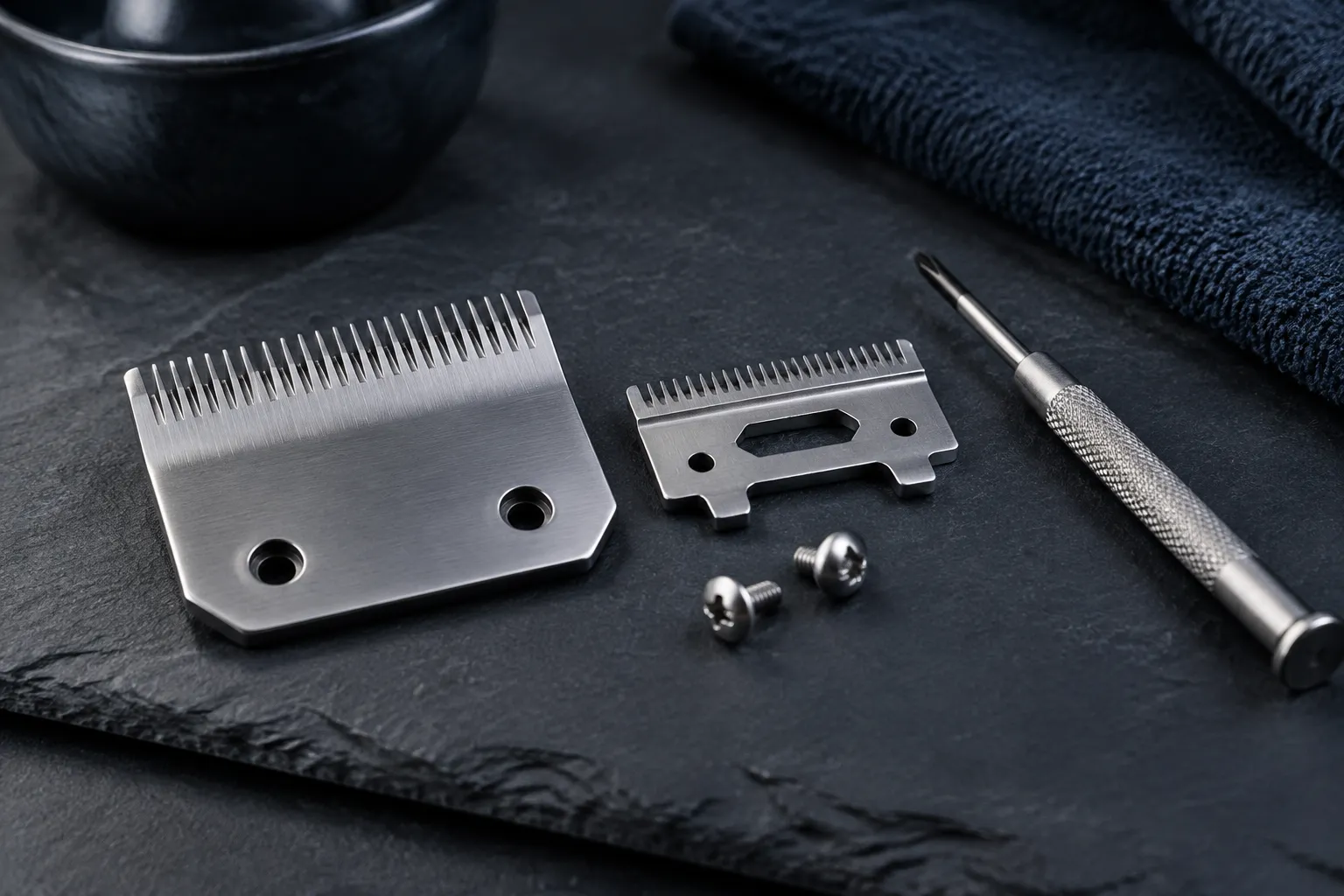
The steps above call for a few small items.
A screwdriver that fits your blade screws, a brush such as the Andis 12415 blade cleaning brush, and a blade oil such as Wahl Premium Blade Oil.
After the adjustment: checking the blades
The Ceramic Clipper Blade Company guide finishes its zero-gap steps with a short check that also works if you keep Wahl’s spacing. Brush away loose hair, put a couple of drops of blade oil on the blades, run the clipper for about 20 seconds and wipe off the excess. Then listen. The guide says that if the blades are very loud, you may need to readjust them by trial and error.
The same guide’s troubleshooting list is short: make sure the screws were loose enough for the blades to move, that the blades sit flush against each other, and that the screws are tight enough to lock them in place. It also warns against over-tightening, which can damage the blades, and suggests recording the job on your phone or taking pictures the first time you take a clipper apart, so you can retrace your steps. If none of that fixes it, it points you back to the owner’s manual.
Wahl’s own guide adds the step that matters most for skin: check where the top blade sits against the bottom blade before the clipper touches anyone. Wahl’s figure is 1/32 to 1/16 inch back from the bottom blade’s teeth, and it lists nicks as a sign to check alignment.
Safety Notes
- Test on your hand before you test on a client or yourself.
- A closer cut can irritate or nick skin, and Wahl’s guide warns about nicks when blades are misaligned.
- Replace blades that are chipped or broken instead of trying to fix them with alignment. See how often to replace clipper blades.
Heads up
Test on your hand before you test on a client or yourself.
What Viewers Say
In YouTube comments under an Andis cordless clipper review, several viewers disagreed with the reviewer, saying they zero-gapped the blade by loosening the screws without bending anything. Under a Wahl Magic Clip review, others asked whether zero-gapping is needed on new clippers. These are anecdotal comments, and we cannot verify them.
Related: the right blade also changes how close you cut. See taper vs fade blades, and our zero gap trimmers guide for trimmers set up this way.
What Wahl Says to Do Every Time
Whatever alignment you choose, blade care decides how the clipper cuts. The Wahl Clipper Maintenance Guide lists a routine for each time the clipper is used:
- Brush hair clippings and debris from the blades and carriage.
- Sanitize the blade set with disinfectant, following the label.
- Oil the blade set: one drop in the center of the moving top blade, one drop at each end of the top blade, and one drop at the heel of the stationary bottom blade on each side. Then run the clipper to spread the oil.
Wahl lists dirty or dry blades as a reason a clipper pulls hair, so a clipper that pulls after you adjust it may just need cleaning and oil.
Troubleshooting From the Maker
Wahl’s guide also has a short troubleshooting list that is useful before you touch the screws:
| Problem | What Wahl says to check |
|---|---|
| Clipper pulls hair | Clean and oil the blades, replace them if dull, and check blade alignment |
| Blade nicks or cuts | Check blade alignment, and replace the blade set if teeth are chipped or broken |
| Loud noise | Adjust the power screw to retune the clipper |
| Motor runs but the blade sticks or does not move | Clean and oil the blade set, replace it if teeth are broken, or adjust the power screw |
Two lines in that guide matter for anyone zero-gapping. First, nicks point back to alignment, so a closer setting raises the stakes. Second, Wahl says to replace blades in sets: one moving top blade and one stationary bottom blade, never one half alone, and to replace both when either has broken or bent teeth. It also lists dull blades and rusty blades as reasons to replace right away.
Replacement blades: replace the set, match the holes
Two facts from the sources decide which replacement blade you buy. Wahl’s maintenance guide says to replace blades as a set, one moving top blade and one stationary bottom blade, never one half alone. And the Ceramic Clipper Blade Company explains that Wahl blade slides come with two or three holes; you can see which you have by taking the screws out of the fixed blade. Its guide says a two-hole slide can be zero-gapped and a three-hole slide needs replacing first.
For the Magic Clip, Wahl sells its stagger-tooth blade as a set. On Amazon it’s the Wahl Professional Magic Clip 2-Hole Stagger-Tooth Replacement Blade, listed as a two-piece set, which fits Wahl’s replace-the-pair rule.
Check Wahl Magic Clip 2-Hole Stagger-Tooth Replacement Blade Price
Heat, oil and coolant on a closer blade
Wahl’s How to Oil Hair Clippers page says oiled clippers run at optimum speed and run cooler, and it suggests oiling before you use the clipper or after every use. Andis makes a related point about its Andis Cool Care Plus spray. Andis describes it as a 5-in-1 formula that disinfects, cools, lubricates, cleans and prevents rust, but its product page FAQ says it doesn’t replace blade oil: Andis recommends a few drops of oil before and after use, and again during a cut if the blade starts to feel warm or dry.
Check Andis Cool Care Plus Price
Factory-Adjustable Blades as an Alternative
If you want a closer cut without moving screws yourself, some makers sell blades with an adjustment built in. On October 13, 2026 we read three product pages. Wahl lists the 5 Star Cordless Senior with a “Zero Gap adjustable 5-Star Standard Blade.” Andis lists the Master Cordless Black Label with an adjustable Phaze blade from 0000 to 0A, and the reVITE with an adjustable Fade blade from 00000 to 000. These are the makers’ own descriptions, and they do not say a hand-set zero gap is safe.
Sources: Wahl Senior page, Andis Master Cordless Black Label page and Andis reVITE page. See our Wahl guide and Andis guide for the specs.
Factory-adjustable models mentioned above
If you would rather not move screws yourself, these are the models named in this section.
Wahl 5 Star Cordless Senior · Andis reVITE
The Andis Master Cordless Black Label is a special edition and isn’t linked here; see Andis’s page above for it.
Trimmers or Clippers?
Our zero gap trimmers guide covers trimmers sold with a close-cutting setup. The process in the Wahl guide above is written for clipper blade sets, so do not assume it applies to a foil shaver or a trimmer with a different blade layout. Check your own manual first.
Trimmers are a different job mechanically. The Ceramic Clipper Blade Company gives separate steps for T-blade trimmers such as the Wahl Detailer and the Andis T-Outliner: on those models both blades are held together by secondary screws, so you remove the blade, loosen the smaller screws, align the blades flush, tighten the small screws again and then refit the blade.
Andis is the one maker here that addresses it directly for a trimmer. On its customer care FAQ, the answer to “How can I adjust the blade on my Andis T-Outliner for a closer cut?” points to its own video, “Zero-Gapping Your T-Outliner,” which shows how to adjust the blade so it’s properly aligned. Andis describes the Andis T-Outliner as a corded trimmer with a carbon-steel T-blade and a 7,200 strokes-per-minute magnetic motor (Andis product page).
If the teeth are chipped, alignment won’t save the blade. Andis lists the carbon-steel T-blade, item 04521, as a compatible replacement for the T-Outliner; on Amazon it’s the Andis 04521 Carbon Steel T-Blade.
Check Andis 04521 Carbon Steel T-Blade Price
Related: why clippers run hot and loud.
Who should skip zero-gapping
The sources point to a few groups who are better off leaving the factory setting alone:
- Anyone cutting without a test run. Wahl’s spacing exists to stop the clipper cutting too close or the moving blade touching skin, and the vendor guide’s own advice is to check the blades after every adjustment.
- Owners of three-hole Wahl slides. The Ceramic Clipper Blade Company says these need a part swapped before the blades can align.
- Anyone worried about cover. Some makers say plainly that modifications are on you. TPOB’s Slime 2 product page, for example, states that it accepts no responsibility for equipment damage during blade fitting or modifications. Read your own warranty first.
- People who want a closer cut without screws. A clipper with a factory-adjustable blade, covered above, gets you closer without changing the alignment by hand.
The bottom line on zero-gapping
Zero-gapping is a real barber technique, but it’s a choice to cut closer than Wahl’s own setting, so make it slowly and check the blades before they touch skin. If you want the closer cut without the screwdriver, a factory-adjustable clipper like the Wahl 5 Star Cordless Senior is the simpler route, and either way, keep Wahl Premium Blade Oil on the bench.
FAQ
What does zero-gapping a clipper mean? It means aligning the top and bottom blades so there is no overlap, for a closer cut, per a blade vendor’s guide.
Does Wahl recommend zero-gapping? Wahl’s maintenance guide gives a spacing of 1/32 to 1/16 inch behind the bottom blade teeth, so it does not describe a zero setting.
Can every clipper be zero-gapped? No. A vendor guide says some blade sets only adjust slightly, and some 3-hole Wahl blade slides prevent it.
Can you zero-gap a trimmer? Yes on many T-blade trimmers. Andis’s customer care FAQ points to its own “Zero-Gapping Your T-Outliner” video, and the Ceramic Clipper Blade Company gives separate steps for trimmers whose blades are held together by secondary screws.
How do you know if the blades are set wrong? The Ceramic Clipper Blade Company says very loud blades may need readjusting, and Wahl’s guide lists nicks and pulling as signs to check alignment.
Do you need to oil blades after zero-gapping? Yes. The vendor guide says to oil the blades whenever you adjust them and run the clipper for about 20 seconds before wiping off the excess.


